Understanding how Red Team tools work and are used enables the Blue Team to develop better detections in their EDR/Security software.
This short article details how to install Covenant (https://github.com/cobbr/Covenant) on Ubuntu 20.04 so you can use it as part of a Purple Team exercise.
Build a minimal Ubuntu 20.04 Server, with OpenSSH Server installed as the only additional package. Then connect log on to the server via SSH or the Console.
Next, ensure it is fully updated:
sudo apt update && sudo apt -y upgradeAnd has all the necessary pre-requisite packages:
sudo apt update && sudo apt install -y --no-install-recommends libc6 libgcc1 libgssapi-krb5-2 libicu66 libssl1.1 libstdc++6 zlib1g Once that is complete create a “covenant” user, providing a password when prompted. You can specify any username but ensure you modify the subsequent commands to reflect this.
sudo adduser covenantOnce the account has been created, switch to that account providing the password when prompted and change to the accounts home directory:
su covenant
cd ~
Next, download the Linux .Net 3.1 SDK archive:
curl https://download.visualstudio.microsoft.com/download/pr/4fd83694-c9ad-487f-bf26-ef80f3cbfd9e/6ca93b498019311e6f7732717c350811/dotnet-sdk-3.1.422-linux-x64.tar.gz -o dotnet-sdk-3.1.422-linux-x64.tar.gzOnce the archive has downloaded , create a directory and extract the archive to that directory:
mkdir -p $HOME/dotnet && tar zxf dotnet-sdk-3.1.422-linux-x64.tar.gz -C $HOME/dotnetWhen that extraction is complete, clone the Covenant GitHub Repository:
git clone --recurse-submodules https://github.com/cobbr/CovenantIt would be good for Covenant to start when the server boots, so once the clone is complete, exit back to your sudo enabled account and using your favourite editor create a systemd service entry:
exit
sudo vi /etc/systemd/system/covenant.service
The contents of the file should be as follows, if earlier you chose a different username to “covenant” ensure you modify the paths and User variable accordingly:
[Unit]
Description=Covenant - https://github.com/cobbr/Covenant
After=network.target
[Service]
ExecStart=/home/covenant/dotnet/dotnet run
WorkingDirectory=/home/covenant/Covenant/Covenant
SyslogIdentifier=covenant
Environment=DOTNET_ROOT=/home/covenant/dotnet
User=covenant
AmbientCapabilities=CAP_NET_BIND_SERVICE
[Install]
WantedBy=multi-user.target
Once saved refresh the systemd service cache, enable the service to start at boot and start the service:
sudo systemctl daemon-reload
sudo systemctl enable covenant
sudo systemctl start covenant
The first time you start the service it will take a little time as the app has to be compiled, you can check on it with:
sudo systemctl status covenant

● covenant.service - Covenant - https://github.com/cobbr/Covenant
     Loaded: loaded (/etc/systemd/system/covenant.service; enabled; vendor preset: enabled)
     Active: active (running) since Sun 2022-12-11 06:53:10 UTC; 3s ago
   Main PID: 3775 (dotnet)
      Tasks: 35 (limit: 4575)
     Memory: 79.4M
     CGroup: /system.slice/covenant.service
             ├─3775 /home/covenant/dotnet/dotnet run
             └─3812 dotnet exec /home/covenant/dotnet/sdk/3.1.422/MSBuild.dll -maxcpucount -verbosity:m -restore /home/covenant/Covenant/Covenant/Covenant.csproj -nologo -verbosity:quiet -distributedlogger:Microsoft.DotNet.Tools.MSBuild.MSBuildLogger,/home/covenant/dotnet/sdk/3.1.422/>

Dec 11 06:53:11 covenant covenant[3775]:
Dec 11 06:53:11 covenant covenant[3775]: Read more about .NET Core CLI Tools telemetry: https://aka.ms/dotnet-cli-telemetry
Dec 11 06:53:11 covenant covenant[3775]: ----------------
Dec 11 06:53:11 covenant covenant[3775]: Explore documentation: https://aka.ms/dotnet-docs
Dec 11 06:53:11 covenant covenant[3775]: Report issues and find source on GitHub: https://github.com/dotnet/core
Dec 11 06:53:11 covenant covenant[3775]: Find out what's new: https://aka.ms/dotnet-whats-new
Dec 11 06:53:11 covenant covenant[3775]: Learn about the installed HTTPS developer cert: https://aka.ms/aspnet-core-https
Dec 11 06:53:11 covenant covenant[3775]: Use 'dotnet --help' to see available commands or visit: https://aka.ms/dotnet-cli-docs
Dec 11 06:53:11 covenant covenant[3775]: Write your first app: https://aka.ms/first-net-core-app
Dec 11 06:53:11 covenant covenant[3775]: --------------------------------------------------------------------------------------
When the compile is complete, you will see:
sudo systemctl status covenant

● covenant.service - Covenant - https://github.com/cobbr/Covenant
     Loaded: loaded (/etc/systemd/system/covenant.service; enabled; vendor preset: enabled)
     Active: active (running) since Sun 2022-12-11 06:53:10 UTC; 27min ago
   Main PID: 3775 (dotnet)
      Tasks: 31 (limit: 4575)
     Memory: 436.8M
     CGroup: /system.slice/covenant.service
             ├─3775 /home/covenant/dotnet/dotnet run
             └─3911 /home/covenant/Covenant/Covenant/bin/Debug/netcoreapp3.1/Covenant

Dec 11 06:53:11 covenant covenant[3775]: Write your first app: https://aka.ms/first-net-core-app
Dec 11 06:53:11 covenant covenant[3775]: --------------------------------------------------------------------------------------
Dec 11 06:53:42 covenant covenant[3911]: Found default JwtKey, replacing with auto-generated key...
Dec 11 06:53:43 covenant covenant[3911]: warn: Microsoft.EntityFrameworkCore.Model.Validation[10400]
Dec 11 06:53:43 covenant covenant[3911]:       Sensitive data logging is enabled. Log entries and exception messages may include sensitive application data, this mode should only be enabled during development.
Dec 11 06:53:48 covenant covenant[3911]: WARNING: Running Covenant non-elevated. You may not have permission to start Listeners on low-numbered ports. Consider running Covenant elevated.
Dec 11 06:53:48 covenant covenant[3911]: Covenant has started! Navigate to https://127.0.0.1:7443 in a browser
Dec 11 06:53:48 covenant covenant[3911]: Creating cert...
Dec 11 06:53:48 covenant covenant[3911]: warn: Microsoft.AspNetCore.DataProtection.KeyManagement.XmlKeyManager[35]
Dec 11 06:53:48 covenant covenant[3911]:       No XML encryptor configured. Key {a8191cae-af14-4a34-9abb-4caed81c0055} may be persisted to storage in unencrypted form.
You can connect to the app with your web browser, the default port is 7443. Please note the portal uses a self-signed cert so you will need to acknowledge the browser security warning to proceed.
Once connected you will be greeted with “Register Initial User” page:
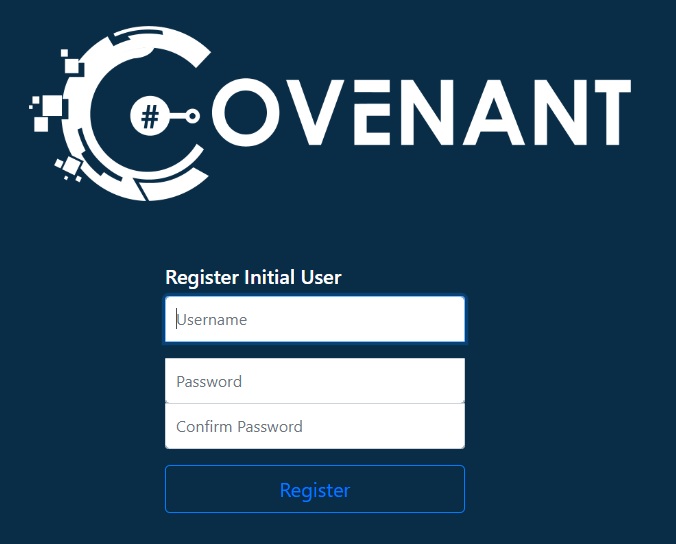
Here you specify the initial admin account name and password and then click “Register”, this creates the account and takes you in to the app.
Now you can play. The wiki can be found at https://github.com/cobbr/Covenant/wiki
 Tech Babble